Web configurator
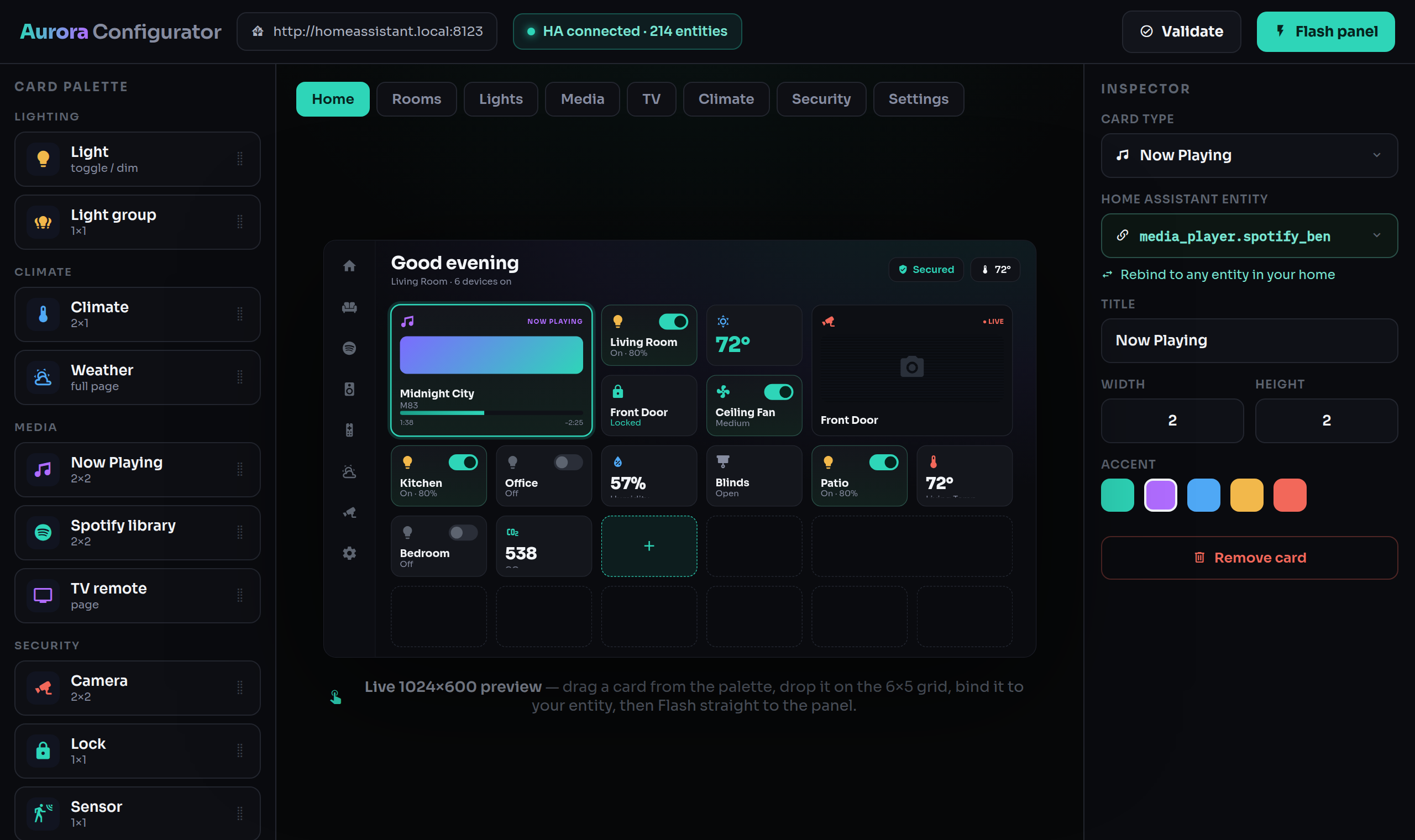
Aurora ships a no-code web configurator that runs locally on your build machine. Point it at your Home Assistant, lay out screens by drag-and-drop, and flash the panel — never touch a line of YAML.
Start it
source ~/aurora-venv/bin/activate        # the venv with esphome installed
python3 aurora-build/configurator/serve.py
Open http://localhost:8765 and sign in with the default password Admin.
Change the password right away
⚙ Settings → Change password. The configurator is reachable by other devices on your network, and it stores a Home Assistant access token. Everything it stores (HA URL, token, panel IP, password hash) lives locally in aurora-build/configurator/config.json, which is gitignored.
Connect to Home Assistant
- Enter your HA URL — use the IP address, not
.local(e.g.http://192.168.1.10:8123). - Create a long-lived access token: in Home Assistant, click your user name (bottom-left) → Security tab → scroll to Long-lived access tokens → Create token → copy it into the configurator.
- Enter your panel's IP address (from your router or HA's ESPHome device page).
What each part does
- Entity-rebind wizard — reads the panel's entity slots, lists your Home Assistant entities, and lets you map each slot to one of yours: lights, locks, media, presence, weather, and the rest.
- Rooms wizard — add, rename and reassign rooms and their lights, fans and switches. Room pages, the room picker and state sensors are generated for you (saved to
rooms.json). - Drag-and-drop page builder — pull cards from the palette onto a 6×5 grid per page, and drag to resize: every card redraws itself for its new footprint (a light can be a 1×1 tile or a full-width dimmer — see every size of every card in the Card Library). The live preview matches the panel pixel-for-pixel. Your layout is saved to
layout.json. - Flash button — runs the whole
layout.json → aurora-gen.yaml → build → OTApipeline and sends the personalized firmware to the panel wirelessly.
Your design lives in layout.json and rooms.json on your computer, so you can tweak and re-flash any time.
The same pipeline, by hand
The Flash button is just running these — useful if you prefer the terminal:
python3 aurora-build/configurator/gen.py            # layout.json -> aurora-gen.yaml
python3 aurora-build/configurator/gen.py --check    # generate + validate, no write
esphome run devices/guition-esp32-p4-jc1060p470/aurora-gen.yaml --device <panel-ip>
gen.py reuses the hand-built hardware/font/style base from aurora.yaml and splices in the generated pages and state sensors, producing a self-contained aurora-gen.yaml.
Preview without a panel
Render the generated UI in a desktop window (real firmware, via ESPHome's host platform):
./aurora-build/configurator/emulate.sh --live